IronChain
- 113
- Global rank
- 84
- Month rank
- 76
- Week rank
IronChain is destructive ransomware and a wiper-like threat that uses elevated privileges, kernel-level components, security-control interference, and file encryption to disrupt Windows systems and potentially cause irreversible data loss.
- Ransomware
- Type
- Unknown
- Origin
- 1 February, 2026
- First seen
- 18 October, 2026
- Last seen
How to analyze IronChain with ANY.RUN
IOCs
IP addresses
- 135.233.95.135
- 208.95.112.1
- 57.153.246.3
- 72.246.29.11
- 150.171.109.101
- 172.211.123.248
- 95.100.158.115
- 135.232.92.137
- 23.59.18.102
- 23.11.40.157
- 95.100.158.123
- 20.42.65.90
- 20.190.159.64
- 23.207.210.139
- 204.79.197.203
- 40.126.31.3
- 74.179.77.204
- 74.178.240.51
- 2.23.246.101
- 23.11.206.107
Hashes
- 16f83f056177c4ec24c7e99d01ca9d9d6713bd0497eeedb777a3ffefa99c97f0
- 96ad1146eb96877eab5942ae0736b82d8b5e2039a80d3d6932665c1a4c87dcf7
- 8b10c53241726b0acc9f513157e67fcb01c166fec69e5e38ca6aada8f9a3619f
- 47359c7379380b3c67e120b2b84ff2b22a58b58b4b2cba20ee8990b0604c2454
- 1178eec305306fe9bdc104526e617634964c9f702917607c1741473ee877804a
- 0b421030ad035af9ec2fb1138ad663da0e9986714fb353c43c22a252aa1b6be1
- 420d078849f589a040925990654437271beadfce388586ad5c825a82827bc629
- e73574bbb56d1cd23a2c03061d93cea8d17fae73f3d7ad67f9faade27ecb2e28
- 87506be32b55316c4b3732e547760f6404b396aea759b2da33432bf66cf96068
- 67d51889203efdd24e0abf70ecdf72d4521092963e6d2cf60e0ad5f04aad7017
- 0da45bf4c81a49dd1bd9b0e1e64271b78910a1f5ebb3932cf959c34ccff1fbba
- c2c97d6191c09c7aabdf1fc3ce0adb5006ea7cfa0dc7ed5456bbcb7248de2ecc
- b40405b1a8eac88474083b3c35186f8aeb7c888be4c72fdeca51dfeaaaa4608c
- c7ee0d6377378bd6fd37826d802170a032559939c892a7f87be92ce776ed0302
- 4e2e79224b889ff9ff23d91976ea04ff71cafa556201800af7f725ac99f373da
- 80e29a38a8e9a6e88c8b0a4e1b5208be2604796edae19319c3916f4f79a620de
- 16cd2fb9fe6ffdba8acdbf7c1236e0f10486900403ee9d8ac827040f9bba47be
- 39ece69d125a0bea856c54db0413d91a9b9b91931f27043955817902a009082c
- b36126563a9174c4b1514ebeaf1b1287a62aa5c917659ae2c32236b290dafaa7
- 1183bdfb3d0cdb07e169c84910c60e48e3ccf23bb79f00a3de6900f055d1b4f5
Domains
- self.events.data.microsoft.com
- ecs.office.com
- slscr.update.microsoft.com
- fe3cr.delivery.mp.microsoft.com
- google.com
- oneocsp.microsoft.com
- th.bing.com
- ip-api.com
- ocsp.digicert.com
- crl.microsoft.com
- www.microsoft.com
- client.wns.windows.com
- settings-win.data.microsoft.com
- youtubea.com
- login.live.com
- www.bing.com
- messaging.lifecycle.office.com
- nleditor.osi.office.net
- officeclient.microsoft.com
- roaming.officeapps.live.com
URLs
- http://crl.microsoft.com/pki/crl/products/microoceraut2011_2011_03_22.crl
- http://www.microsoft.com/pkiops/crl/microsoft%20secure%20server%20ca%202026.crl
- http://ocsp.digicert.com/mfewtzbnmeswstajbgurdgmcgguabbtrjrydryt%2bapf3gspypfhbxr5xtqqus9tippmhxdiunkhmewnpyim8s8yceajtxtab8my1oj8mfwpz%2f7y%3d
- http://oneocsp.microsoft.com/ocsp/mfqwujbqme4wtdajbgurdgmcgguabbq3l3%2f%2fa6adk8nray2gxzvayrhg4aqub6t%2b2v%2bxq3lso2d33ojhnyhhqoucezmaaaafuwohyjguzpcaaaaaaau%3d
- http://ocsp.digicert.com/mfewtzbnmeswstajbgurdgmcgguabbq50otx%2fh0ztl%2bz8sipi7wewvxdlqqutijuibiv5unu5g%2f6%2brks7qyxjzkceaz1vqyrvgl0erhqlcpm8gy%3d
- https://www.bing.com/dsb/search?dsbmr=1&format=dsbjson&client=windowsminiserp&dsbschemaversion=1.1&dsbminiserp=1&q=q&cc=us&setlang=en-us&clientdatetime=10%2f18%2f2026%2c%2012%3a09%3a33%20pm
- https://www.bing.com/threshold/xls.aspx?t=5&dl=1&f=9&wsbc=1
- https://www.bing.com/th?id=odswg.9bf8d2dd-9b39-4a2c-a27d-ed6fe6463666&pid=dsb
- https://login.live.com/rst2.srf
- https://login.live.com/ppsecure/deviceaddcredential.srf
- https://th.bing.com/th?id=odswg.iotdlocalicon&w=16&h=16&c=1&rs=1&p=0
- http://ip-api.com/json/
- http://ocsp.digicert.com/mfewtzbnmeswstajbgurdgmcgguabbq50otx%2fh0ztl%2bz8sipi7wewvxdlqqutijuibiv5unu5g%2f6%2brks7qyxjzkceasmayxgarewr3pgr9svwmg%3d
- http://oneocsp.microsoft.com/ocsp/mfqwujbqme4wtdajbgurdgmcgguabbr0tbevyklx7a9ylold9hqmcwdxfgqu3pggslehmvkx8utfb6ncihnaqhycezmaaaale%2bvmfuqbvyaaaaaaaas%3d
- http://www.microsoft.com/pkiops/crl/microsoft%20ecc%20update%20secure%20server%20ca%202.1.crl
- https://self.events.data.microsoft.com/onecollector/1.0/
- https://slscr.update.microsoft.com/sls/%7b522d76a4-93e1-47f8-b8ce-07c937ad1a1e%7d/x64/10.0.19045.4046/0?ch=686&l=en-us&p=&pt=0x30&wua=10.0.19041.3996&mk=dell&md=dell
- https://fe3cr.delivery.mp.microsoft.com/clientwebservice/ping
- https://slscr.update.microsoft.com/sls/ping
- https://slscr.update.microsoft.com/sls/%7be7a50285-d08d-499d-9ff8-180fdc2332bc%7d/x64/10.0.19045.4046/0?ch=686&l=en-us&p=&pt=0x30&wua=10.0.19041.3996&mk=dell&md=dell
Last seen at
Key Takeaways
- Destructive ransomware behavior: IronChain combines file encryption with destructive system and disk-level activity that can make recovery difficult or impossible.
- Ransomware with wiper-like characteristics: Although IronChain presents victims with a ransom demand, its technical design does not provide a reliable path to restore affected files.
- Multiple low-level components: The malware carries four Windows kernel drivers intended to support different parts of its attack chain.
- SYSTEM-level persistence: IronChain can create a scheduled task and attempt to establish privileged execution.
- Security and recovery disruption: The malware attempts to interfere with security controls, services, and recovery mechanisms before or alongside destructive activity.
- File encryption: IronChain encrypts selected portions of files using a combination of AES and RSA-based cryptographic operations.
- Potentially limited file targeting: Implementation errors in the analyzed build can prevent some intended file-encryption paths from executing.
- Significant business impact: Successful execution can result in data loss, prolonged downtime, difficult recovery, and substantial incident-response costs.
- Detection opportunities: Driver installation, unusual SYSTEM tasks, destructive file activity, security-service manipulation, and suspicious process behavior can help defenders identify an attack.
- ANY.RUN’s Interactive Sandbox analysis helps investigate IronChain’s behavior, including privilege escalation, driver activity, file encryption, security-control interference, and destructive system operations.
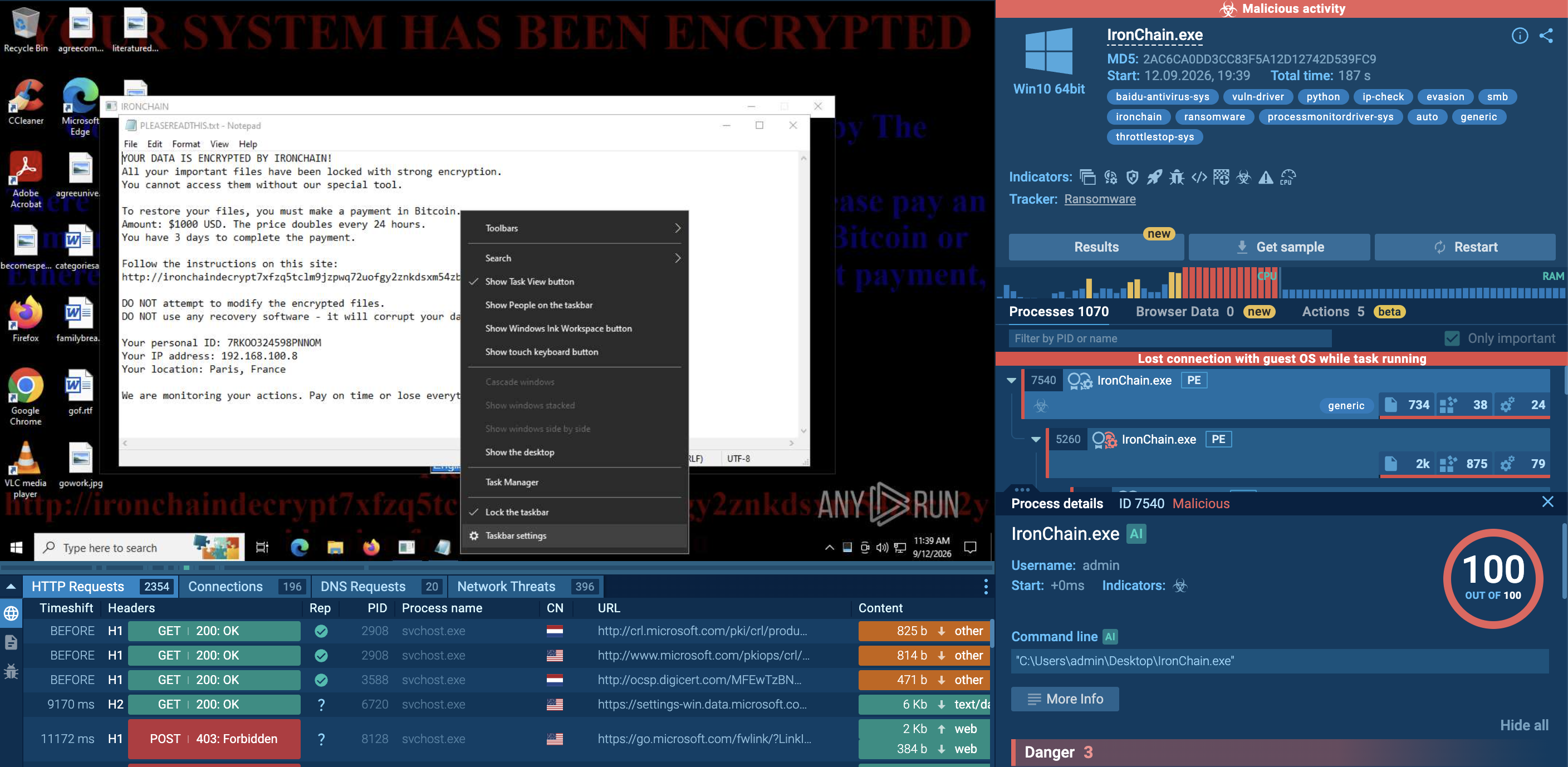
What is IronChain?
IronChain is a Windows ransomware family that combines encryption, persistence, defense evasion, and destructive system activity. Its behavior is particularly concerning because the malware appears designed not simply to make files inaccessible, but to interfere with recovery and potentially cause permanent data loss.
The analyzed build is a 64-bit Windows executable packaged with PyInstaller. Researchers recovered its Python bytecode, supporting files, and four Windows drivers. The malware contains functionality for requesting elevated privileges, establishing persistence, modifying system settings, encrypting files, interacting with physical disks, and spreading through available storage locations.
IronChain therefore represents a broader risk than a conventional file-encrypting ransomware sample. An organization dealing with an infection may have to investigate both encrypted data and potentially destructive changes to the operating system, storage devices, security controls, and recovery infrastructure.
The malware's ransomware presentation also does not necessarily correspond to a dependable recovery mechanism. The analyzed implementation discards information required for reliable cryptographic restoration, meaning that paying the ransom cannot be assumed to result in successful decryption.
Why IronChain Presents a Serious Risk to Businesses
An IronChain infection can affect an organization at several levels simultaneously.
Permanent of Difficult-to-Recover Data Loss
The most significant concern is the possibility that encrypted or damaged files cannot be reliably restored. The analyzed sample's cryptographic design does not preserve all of the information that a conventional decryptor would require.
Operational Downtime
If business-critical workstations, servers, or shared storage are affected, employees may lose access to essential applications and documents. Recovery can become more complicated if the malware also interferes with system services or storage.
Privileged System Access
IronChain attempts to obtain elevated privileges and establish execution under SYSTEM-level context. Higher privileges can allow malware to affect a much broader range of system resources.
Security Control Disruption
The malware attempts to interfere with services and defensive mechanisms. This can reduce visibility for security teams and make investigation more difficult while destructive operations are taking place.
Complicated Incident Response
The presence of multiple drivers and several attack components increases the number of artifacts that responders need to investigate. Security teams may need to examine scheduled tasks, services, drivers, processes, files, network activity, and disk modifications together.
Recovery Infrastructure Exposure
Ransomware incidents become particularly damaging when backup systems or recovery mechanisms are accessible from an infected environment. Organizations should therefore treat backup isolation and recovery testing as important defenses against destructive ransomware.
Victimology: Which Organizations Could Be Exposed?
IronChain is primarily a threat to organizations that depend on Windows endpoints, centralized file storage, and continuously available business systems.
Potentially affected environments include:
- Small and medium-sized businesses
- Enterprises with large Windows fleets
- Manufacturing organizations
- Professional services companies
- Financial and commercial organizations
- Healthcare providers
- Educational institutions
- Government organizations
- Organizations operating shared file servers or network storage
However, the presence of a particular industry or geography does not determine whether an organization is at risk. Exposure depends more heavily on factors such as endpoint security, privilege management, backup architecture, application controls, vulnerability management, and the organization's ability to detect unusual driver and process activity.
Organizations with weak separation between production systems and backup infrastructure may face greater consequences if ransomware spreads beyond individual endpoints.
How Does IronChain Operate?
Observing an IronChain sample inside ANY.RUN’s Interactive Sandbox shows a multi-stage execution process involving privilege escalation, persistence, kernel drivers, defensive interference, file encryption, disk operations, and additional destructive behavior.
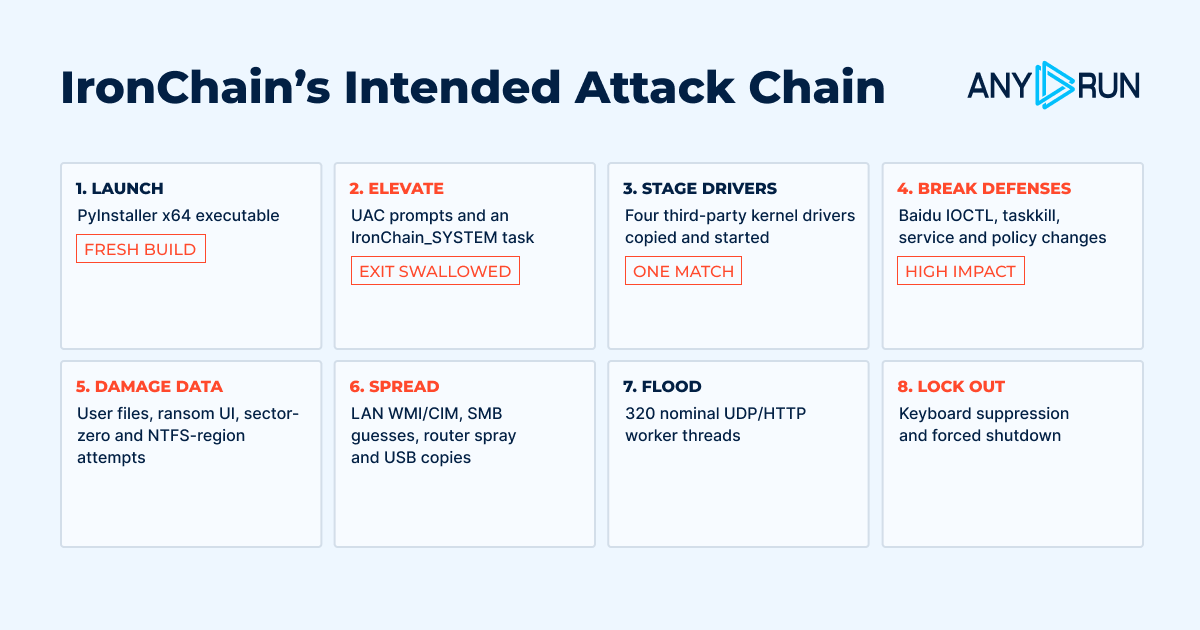
Stage 1: Initial Execution and Privilege Handling
IronChain begins by attempting to obtain the privileges required for more sensitive operations.
The malware can request administrator rights and then work toward establishing a more privileged execution context. One of the mechanisms involved in this process is the creation of a scheduled task named IronChain_SYSTEM.
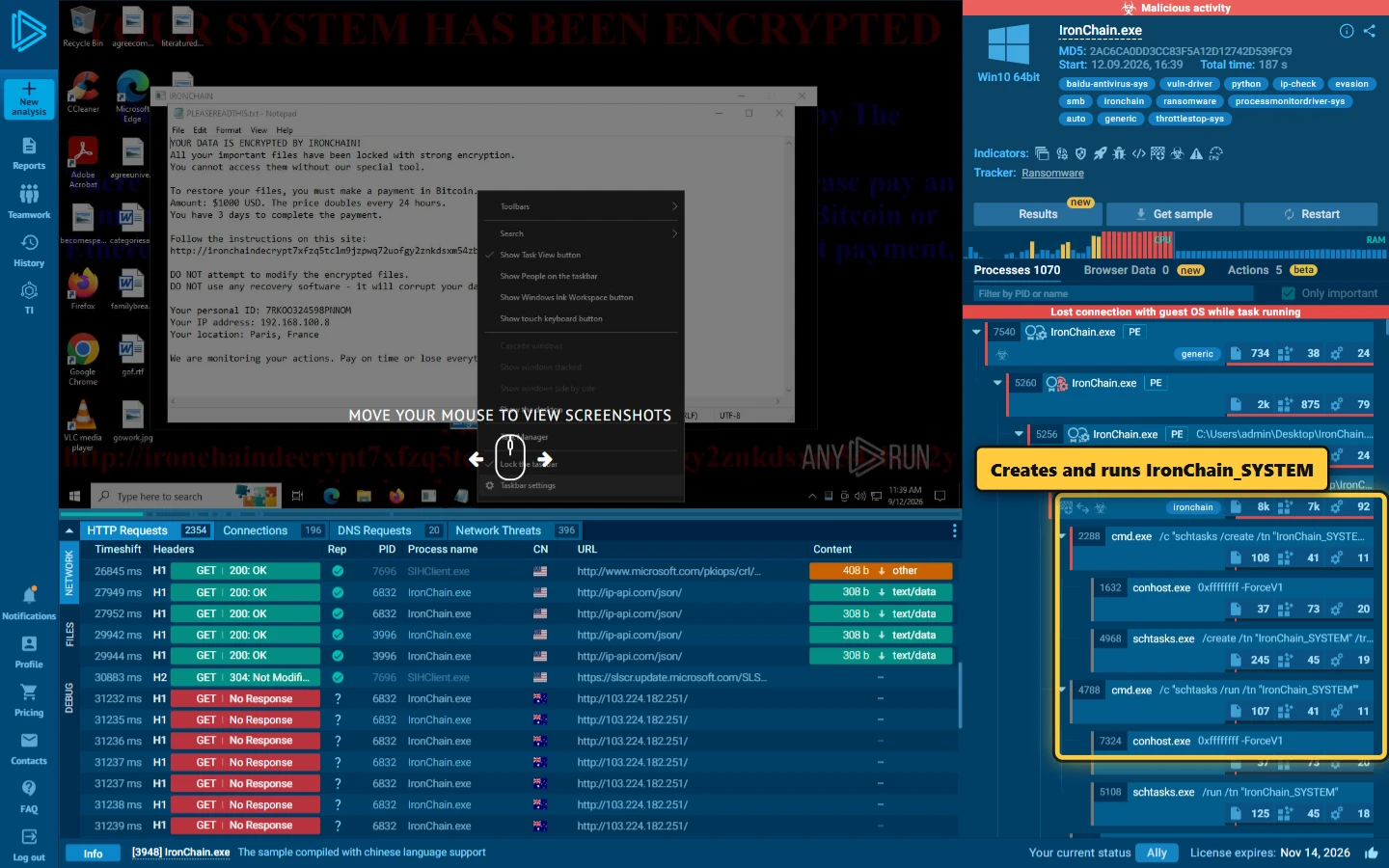
The analyzed code also relocates the executable and starts another copy as part of its execution flow. Importantly, programming errors in the sample mean that calls intended to terminate earlier processes can be caught by broad exception handlers. As a result, execution can continue rather than stopping at the point originally intended.
This means that the actual process behavior can differ from what the developers appear to have intended.
Stage 2: Establishing SYSTEM-Level Persistence
IronChain creates and executes a scheduled task associated with SYSTEM privileges.
This provides the malware with a privileged execution path and can allow subsequent operations to run with substantially greater access than an ordinary user process.
The public ANY.RUN analysis also observed task creation and execution during the sample's activity.
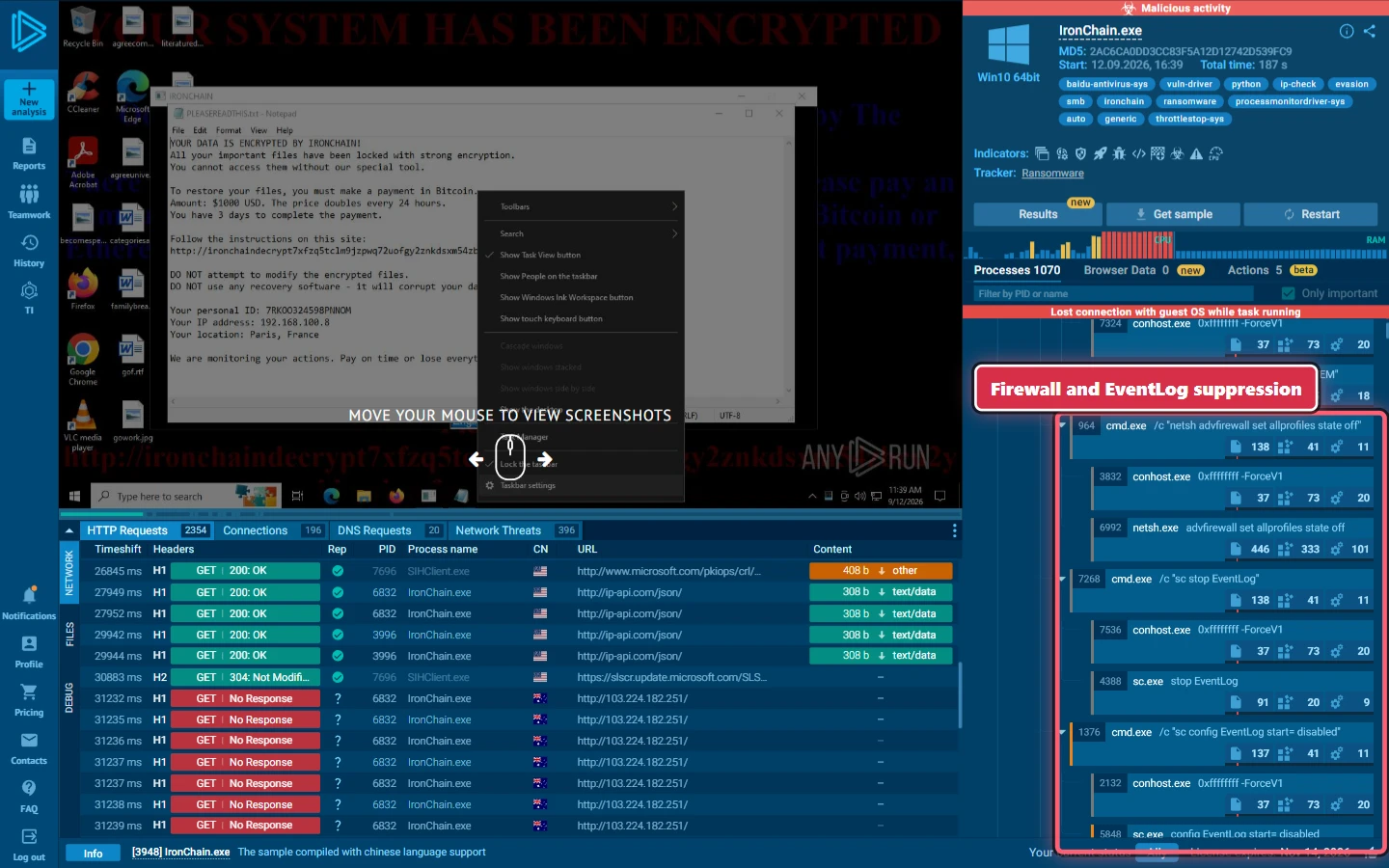
For defenders, unexpected scheduled tasks that appear shortly before destructive behavior should therefore receive particular attention.
Stage 3: Loading Kernel-Level Components
The analyzed build contains four Windows drivers:
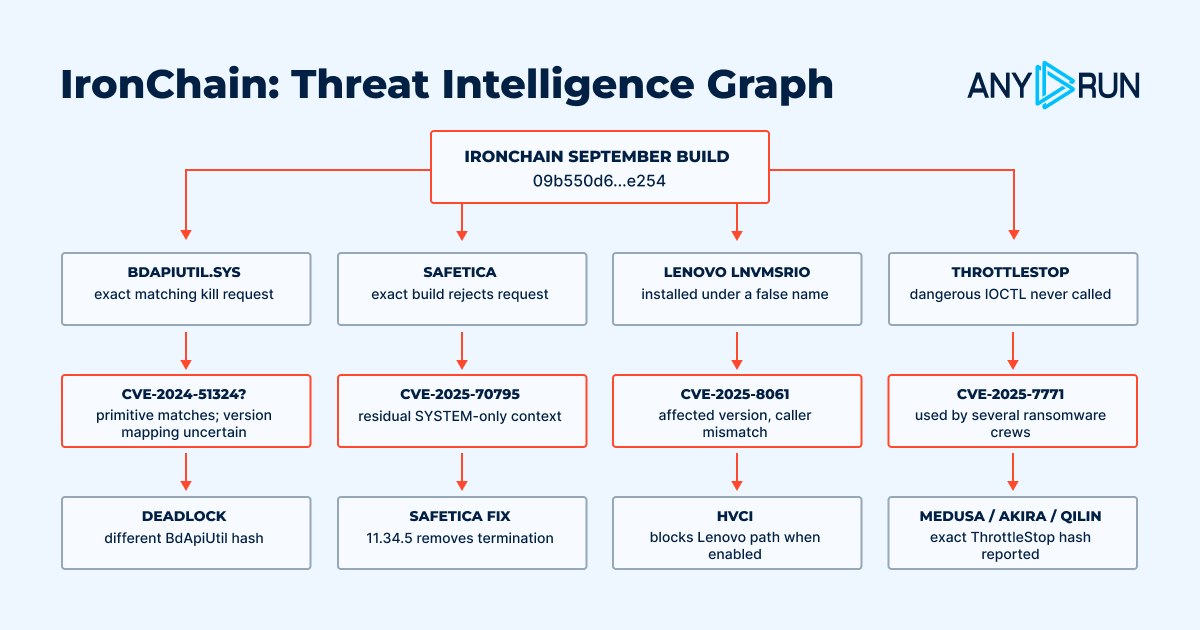
- Baidu BdApiUtil.sys: The Baidu driver has the only fully matching process-termination chain, using the expected device, IOCTL, and four-byte PID input.
- Safetica ProcessMonitorDriver.sys: Safetica’s driver exposes a termination function, but IronChain uses the wrong IOCTL and input size, causing both checks to fail.
- Lenovo LnvMSRIO.sys: IronChain’s device name and IOCTL do not match the Lenovo driver’s actual interface, so its low-level capabilities are not correctly invoked.
- ThrottleStop ThrottleStop.sys: IronChain stages the ThrottleStop driver and a potentially dangerous IOCTL, but the analyzed sample never actually calls it.
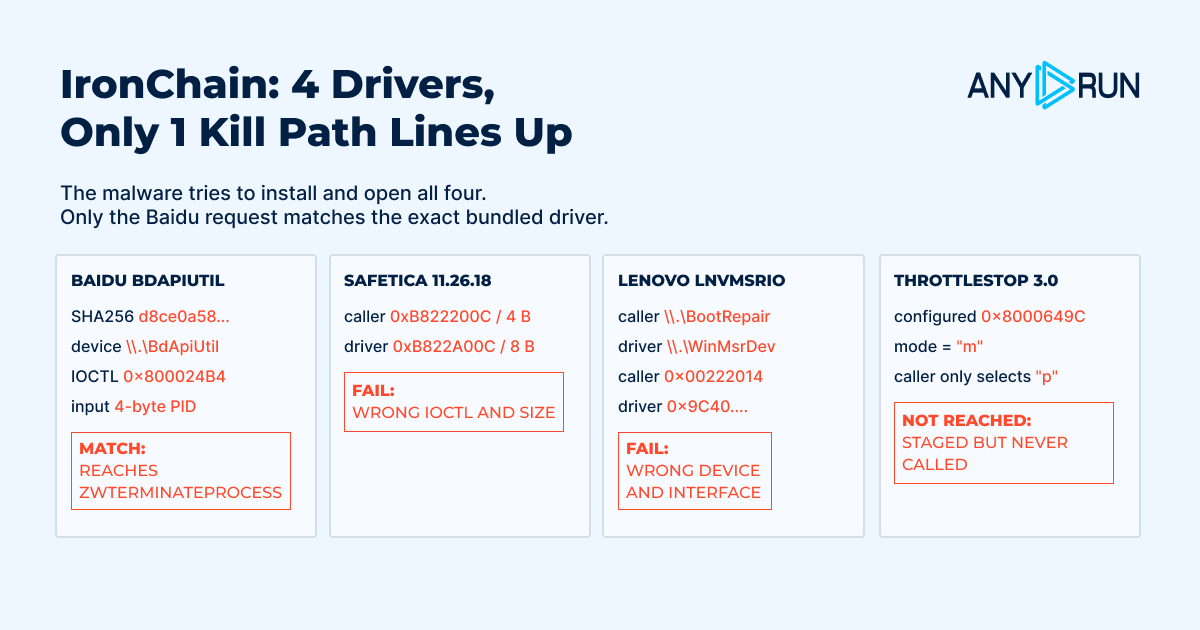
These components appear to be intended to provide low-level capabilities that ordinary user-mode code cannot easily obtain.
However, the presence of a driver does not automatically mean that every corresponding capability works successfully. The research found that only the Baidu driver has a complete interface match with the malware's process-termination code. Other driver integrations contain mismatched device names, IOCTL values, input sizes, or unused functionality.
This distinction is important when assessing IronChain: The malware contains several potentially dangerous components, but static analysis does not establish that every planned operation succeeds during an actual infection.
Stage 4: Encrypting Files Without a Reliable Recovery Path
IronChain displays a ransom demand, but its encryption design does not preserve everything required for reliable decryption.
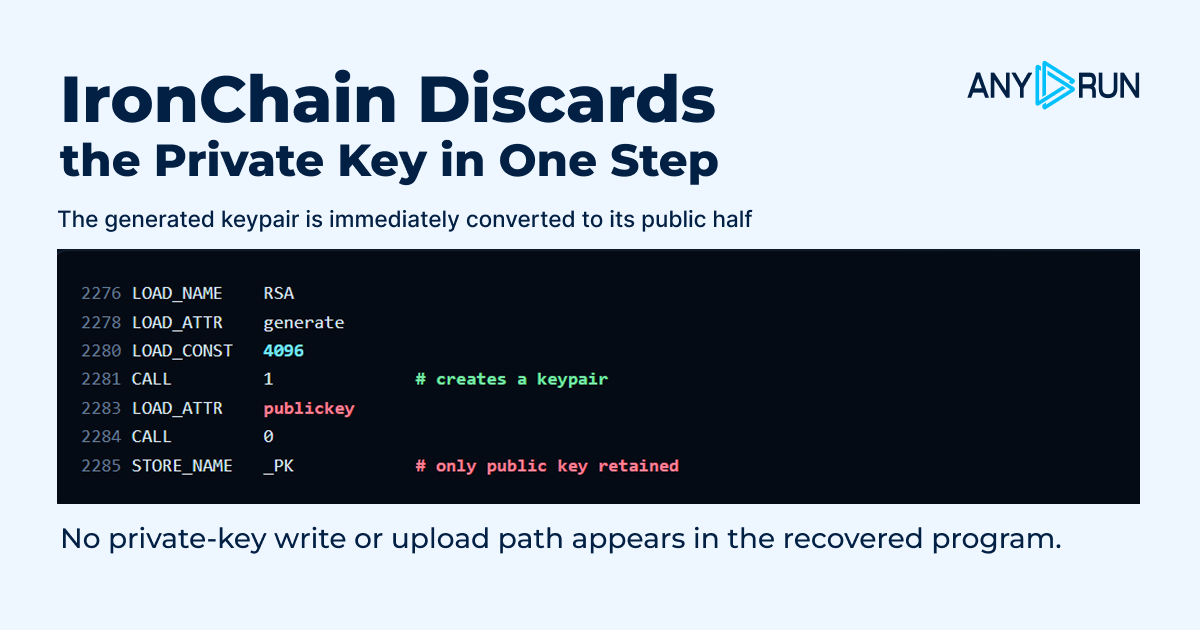
At startup, the malware generates an RSA-4096 key pair and immediately reduces it to the public key: _PK = RSA.generate(4096).publickey()
No recovered code shows the private key being exported, stored, or transmitted. For each file, IronChain generates a fresh 32-byte AES key, protects that key with RSA-OAEP, and then applies two to seven randomized byte-mutation passes before AES-GCM encryption.
The mutation process is also destructive. It does not preserve the random shifts or per-byte selection masks needed to reverse those transformations. As a result, even recovering the missing RSA private key would not necessarily restore the original file contents.
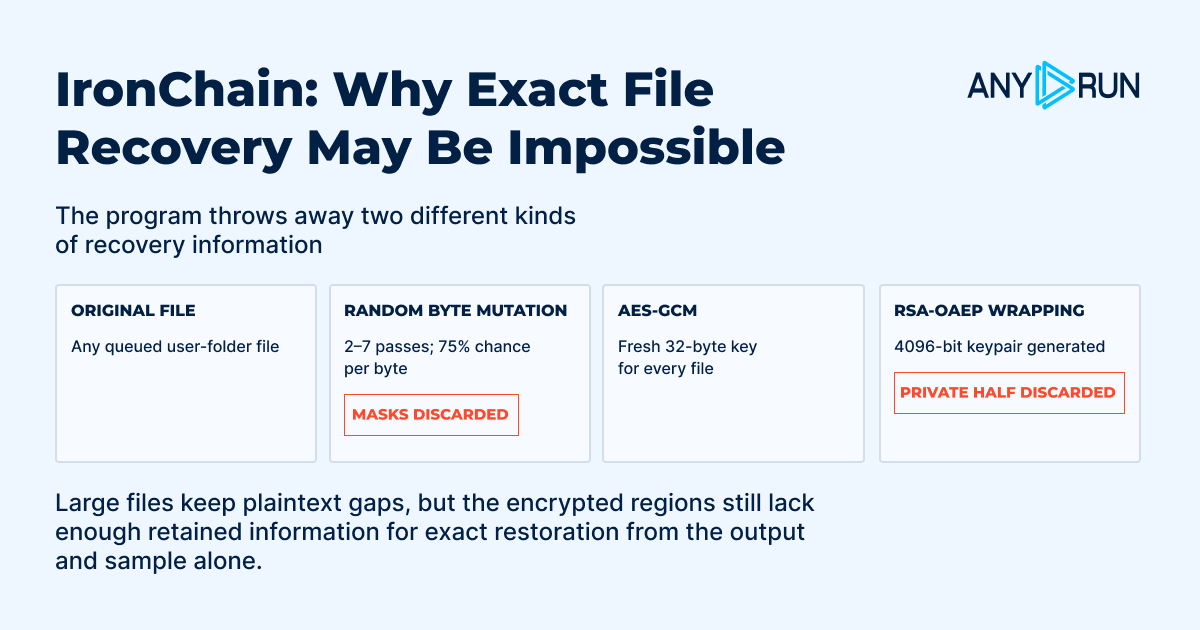
For large files, IronChain encrypts the first 512,000 bytes, a random 51,200-byte section in the middle, and the final 512,000 bytes rather than processing the entire file. This reduces processing overhead while still making files unusable, although the remaining plaintext sections may provide opportunities for partial recovery.
Overall, the analyzed build does not retain enough information for deterministic restoration. The ransom demand therefore should not be treated as evidence of a reliable decryptor, reinforcing IronChain's wiper-like and destructive characteristics.
Stage 5: Searching for Files and Encrypting Data
IronChain first scans common user folders, including Desktop, Documents, Downloads, Pictures, Videos, and Music. It submits discovered files to a 48-worker pool for processing.
The malware also contains a function intended to expand the target list to Windows directories, application folders, AppData, and other drives. However, a variable-name error causes this broader traversal to fail: the code stores %SystemRoot% in _rt but then attempts to read an undefined global variable, rt. A broad exception handler catches the resulting NameError and returns.
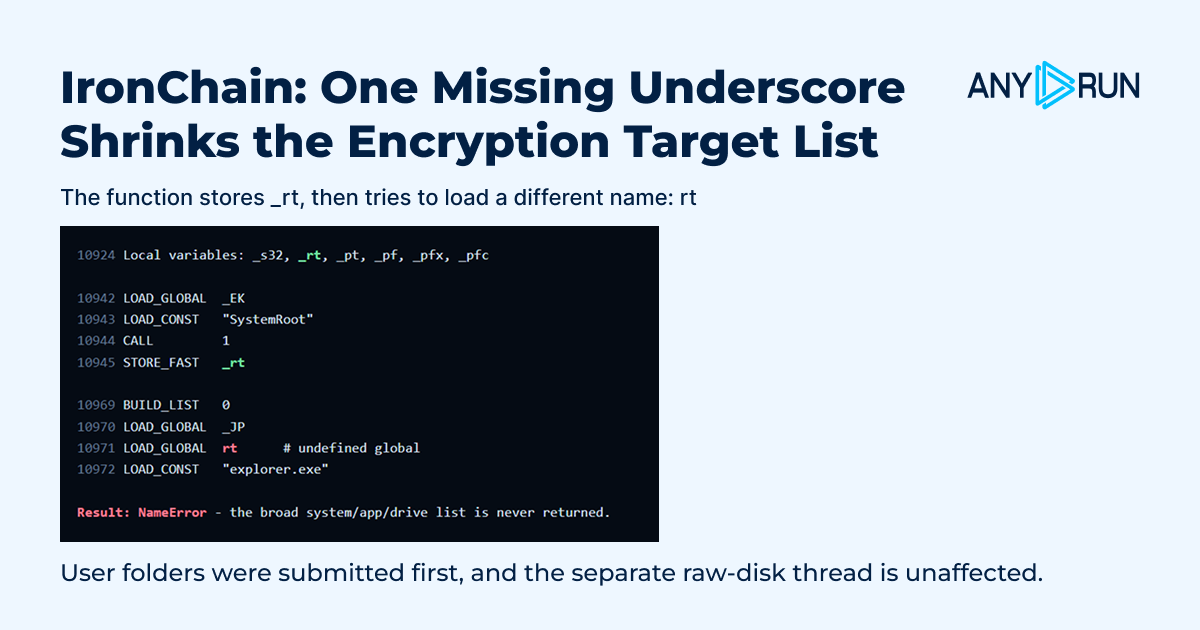
_The code assigns rt locally but then references the undefined global rt
As a result, files already collected from common user directories can still be encrypted, while the later system and application targets and non-C drives are normally skipped. The separate raw-disk thread starts earlier and is not affected by this error.
This distinction is important when assessing IronChain's impact: its code contains broader file-targeting logic, but the analyzed build does not normally execute that entire path.
Stage 6: Network and System Activity
IronChain also performs network and system-related activity alongside its destructive functions.
The sample contacts ip-api.com to obtain geolocation information that can be displayed by the ransom interface.
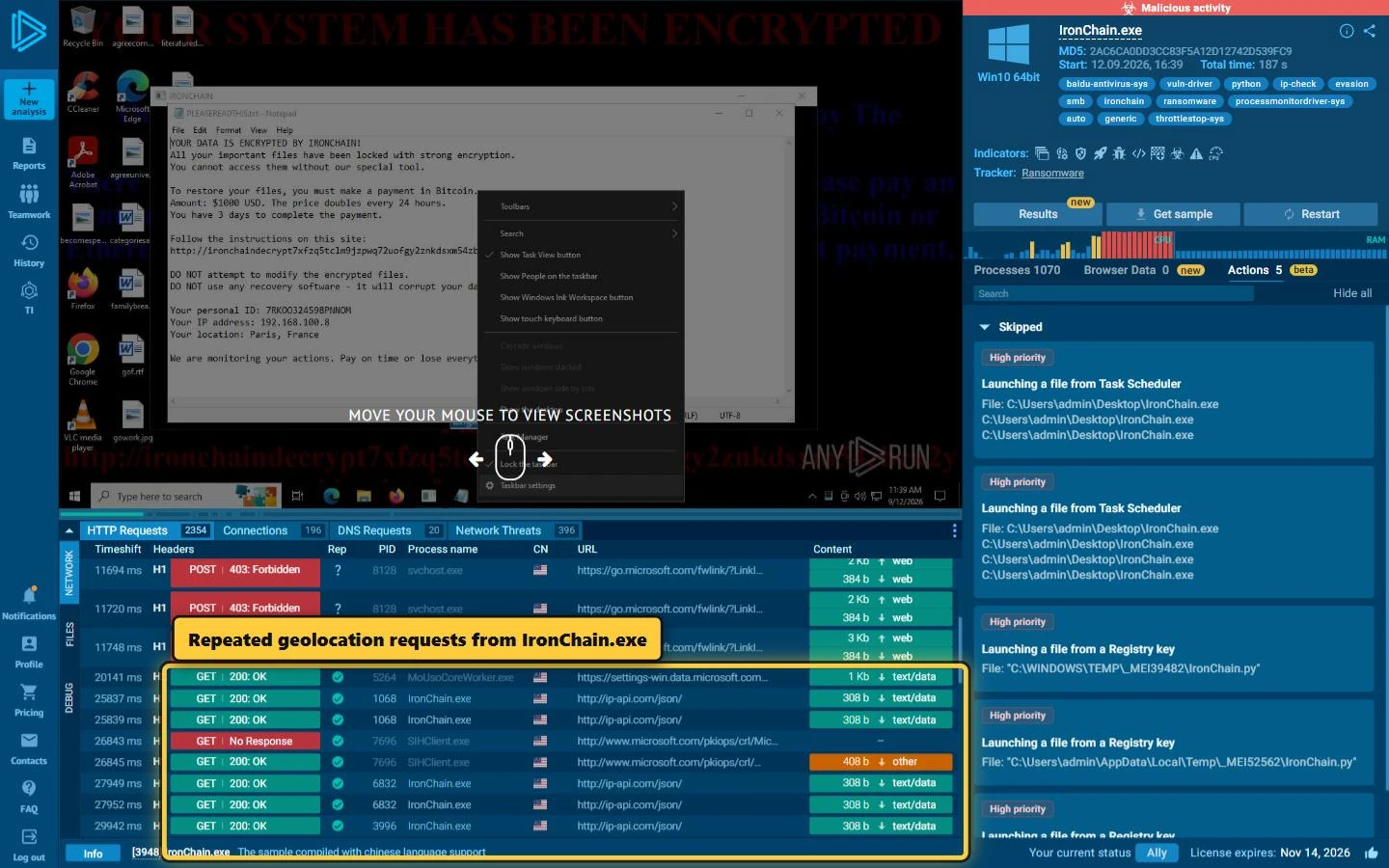
ANY.RUN also observed repeated requests associated with 103.224.182.251, but the address does not appear in the recovered Python bytecode and received no response during the sandbox session.
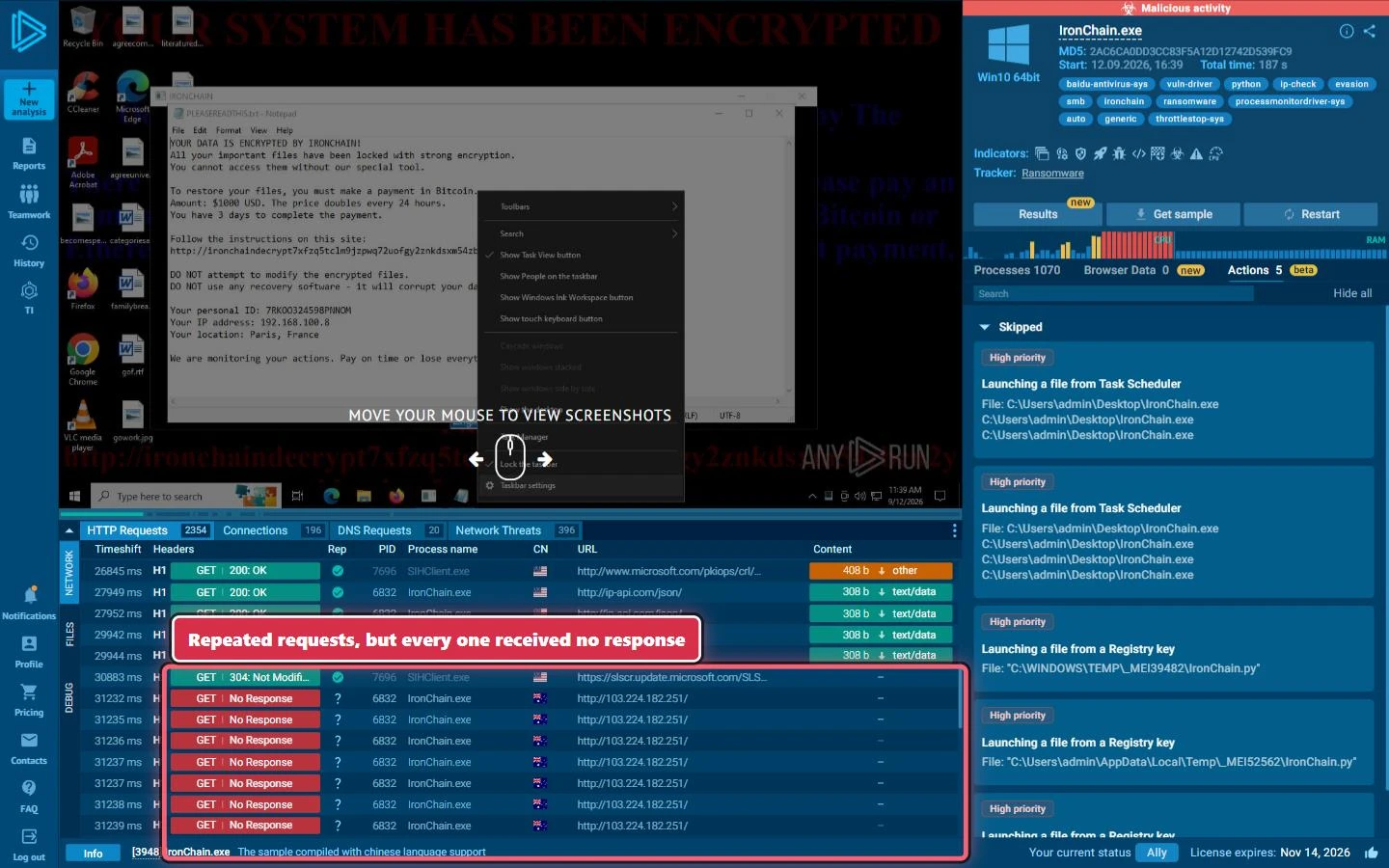
There is no evidence from the analyzed sample that this address functions as an IronChain command-and-control server. No tasking, key exchange, Host header, or recovered command channel was identified.
The malware also contains destinations associated with flooding, route selection, and SSDP discovery, but these do not establish an operator-controlled C2 infrastructure.
What Makes IronChain Different from Conventional Ransomware?
IronChain's most important characteristic is the gap between its ransomware presentation and its technical recovery prospects.
Traditional ransomware generally encrypts files while preserving enough information for the attacker to offer a decryption service. IronChain's analyzed implementation does not provide the same assurance.
The malware generates an RSA key pair but retains only the public component. It also performs additional randomized transformations on file data without preserving all of the state needed to reverse them.
This means that even possession of the missing private key would not necessarily solve every stage of the restoration problem.
For organizations, this changes the incident-response priority. Rather than assuming that files can eventually be recovered through a ransom negotiation, defenders should focus on containment, preservation of evidence, and restoration from trusted backups.
Observable Signs of an IronChain Infection
Security teams can investigate several groups of indicators when IronChain is suspected.
File and Process Activity
Potential signals include:
- An unsigned or unusual PyInstaller executable appearing unexpectedly
- Sudden execution of a large Python-based executable
- Rapid modification of files across multiple user directories
- Creation of suspicious .hta, image, or data files associated with the malware
- Unexpected process duplication or continued execution after privilege changes
Persistence and Privilege Indicators
Look for:
- A scheduled task named IronChain_SYSTEM
- Unexpected SYSTEM-level scheduled tasks
- New services associated with unfamiliar drivers
- Driver installation outside approved software deployment processes
- Privilege-elevation activity immediately before destructive file operations
Driver-Related Indicators
The analyzed build contains four driver families, making driver telemetry particularly valuable.
Security teams should investigate unexpected appearances of:
- BdApiUtil
- STProcessMonitorDriver
- LenovoBootRepair
- ThrottleStop
The exact driver artifacts and interfaces should be correlated with other evidence rather than treated as standalone proof of an IronChain infection.
Security Control Manipulation
Additional warning signs include:
- Attempts to disable the Windows firewall
- Unexpected attempts to stop or disable EventLog
- Interference with monitoring utilities
- Attempts to remove or impair recovery mechanisms
- Suspicious administrative commands appearing shortly before mass file modification
Network and Storage Activity
Potential indicators include:
- Unexpected outbound connections from a ransomware process
- Requests to public geolocation services
- Direct access to physical-drive devices
- Unusual access to network shares
- Rapid file activity across removable storage
No single IP address, domain, filename, or driver should be treated as definitive evidence. Behavioral correlation provides a stronger basis for detection.
IronChain Detection Strategies
Effective detection of IronChain should combine endpoint, identity, network, and file-system telemetry.
Monitor for Unapproved Kernel Drivers
Driver installation is one of the strongest opportunities for early detection.
Organizations should maintain an inventory of approved drivers and investigate kernel components that appear unexpectedly, especially when they arrive shortly before encryption or security-control changes.
Application control and vulnerable-driver protections can also reduce the ability of malware to abuse known driver interfaces.
Connect Key Indicators
High-priority detections should connect events such as:
- SYSTEM task creation
- Driver installation
- Privilege escalation
- Security-service manipulation
- Rapid file modification
- Physical-drive access
A combination of these behaviors provides stronger evidence than any individual event.
Preserve Endpoint Evidence
If IronChain is suspected, preserve relevant evidence before making changes that could destroy useful artifacts. Depending on the incident-response plan, this can include:
- Memory
- Process information
- Scheduled-task data
- Driver and service information
- File-system metadata
- Relevant binaries
- Windows event logs
- Network telemetry
- Security-product alerts
Because IronChain may perform destructive disk operations, responders should assess the system state before rebooting.
Using Threat Intelligence to Investigate IronChain
ANY.RUN Threat Intelligence can help SOC and MSSP teams move beyond the initial infected machine and determine whether related activity exists elsewhere.
Threat Intelligence Lookup can help security teams investigate IronChain by correlating various behavioral signals, including:
- File hashes
- Driver hashes
- Filenames
- Scheduled-task names
- Domains
- IP addresses
- Network requests
- File markers
- Process behavior
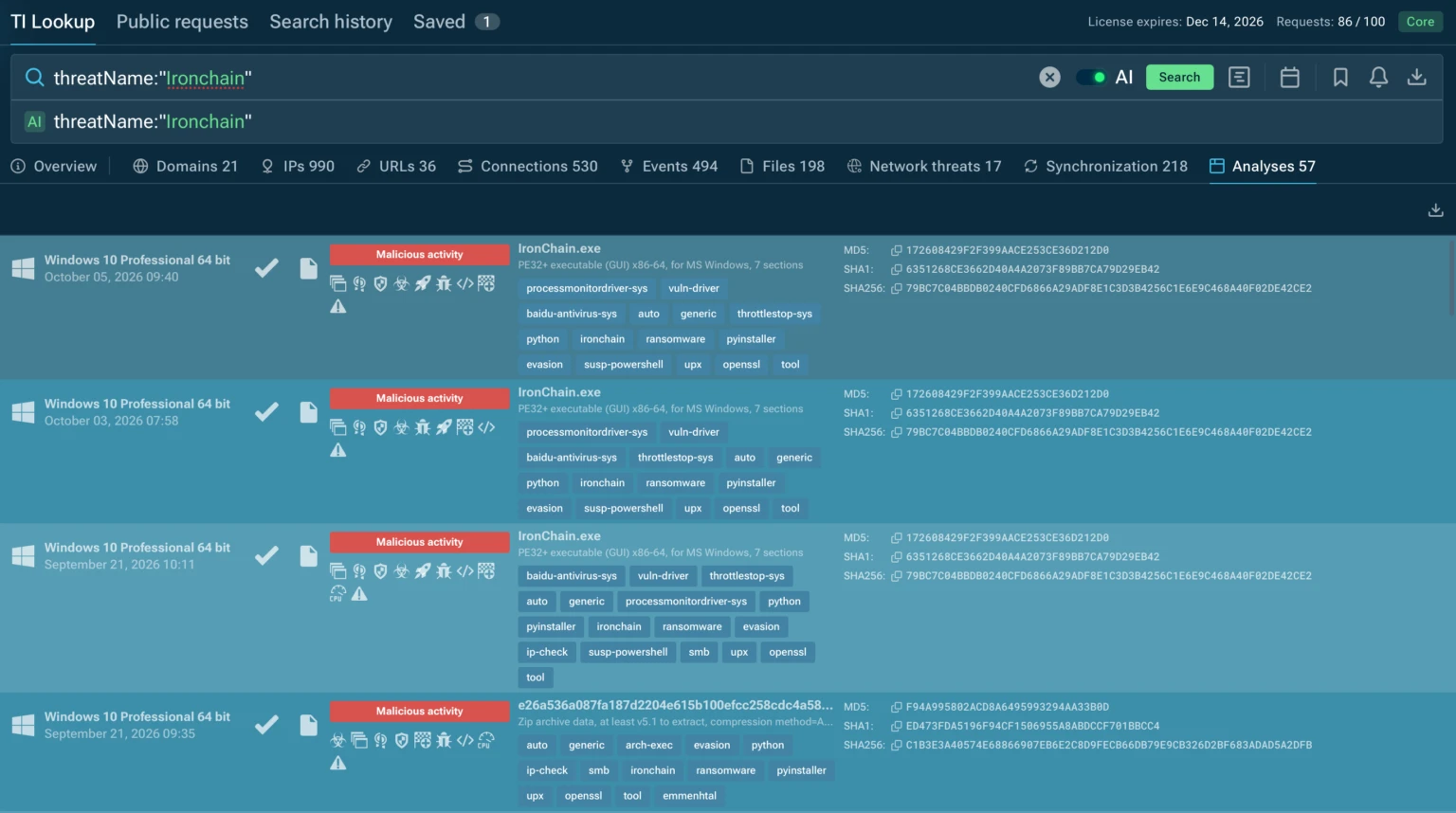
ANY.RUN’s Interactive Sandbox analysis can help reveal IronChain’s privilege escalation, scheduled-task creation, driver activity, file encryption, security-control manipulation, and destructive system operations in an isolated environment. Threat intelligence can then provide broader context by connecting hashes, drivers, network indicators, and other artifacts observed during the investigation.
Responding to a Suspected IronChain Incident
SOCs and MSSPs should treat a suspected IronChain infection as a potentially destructive ransomware incident.
Recommended actions include:
- Isolate the affected endpoint from networks and removable media.
- Assess encryption and system damage before attempting cleanup.
- Preserve forensic evidence, including memory and disk information where appropriate.
- Determine whether storage or boot-related structures were modified.
- Search for related activity across other endpoints and servers.
- Protect backup infrastructure from potentially compromised systems.
- Rebuild affected systems from trusted media when necessary.
- Restore data from known-good backups rather than assuming ransom payment will provide recovery.
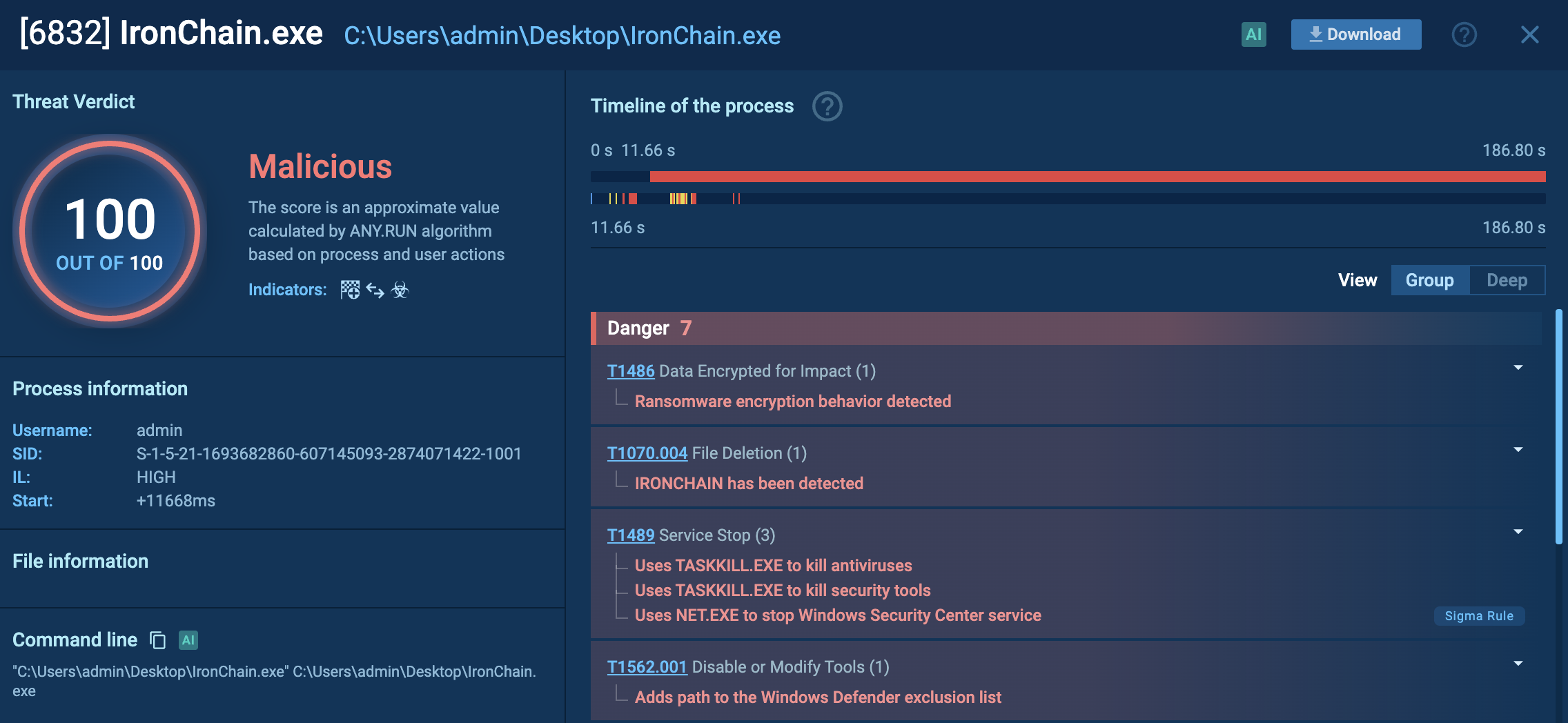
Because IronChain combines encryption with destructive functionality, containment should take priority over attempts to negotiate with the attacker.
Reducing the Risk of IronChain Attacks
Strengthen Endpoint and Application Controls
Restrict the execution of unknown binaries and scripts and use application controls to limit unauthorized software and driver installation.
Limit Privileged Access
Minimize the number of accounts capable of installing drivers, creating privileged scheduled tasks, or modifying security services.
Protect and Test Backups
Keep backups isolated from ordinary endpoint credentials and regularly test restoration to ensure they can support recovery after a destructive attack.
Prevent Driver Abuse
Use vulnerable-driver protections and monitor legitimate driver families for unusual installation paths, renamed files, or unexpected loading behavior.
Adopt Behavioral Detection
Rely on behavioral detections rather than hashes or filenames alone. Detection logic should account for combinations of driver installation, SYSTEM persistence, security-control manipulation, mass file modification, and destructive storage activity.
Use Both Sandboxing and Threat Intelligence
Use sandbox analysis to safely examine suspicious files and behavior before they reach production systems, and threat intelligence to correlate hashes, drivers, network indicators, and other artifacts to identify related threats and improve detection.
Conclusion
IronChain combines ransomware-style encryption with destructive system activity, privileged execution, and kernel-level components.
Its flawed implementation does not make the threat harmless: the analyzed build can still disrupt systems and make recovery difficult.
For defenders, early detection of suspicious drivers, SYSTEM-level persistence, security-control changes, and unusual file activity is critical to containing the impact.
Frequently Asked Questions: IronChain
1. What is IronChain?
IronChain is a Windows ransomware family with destructive and wiper-like characteristics. It combines file encryption with persistence, kernel-level components, security-control interference, and other potentially destructive operations.
2. Does IronChain encrypt files?
Yes. The analyzed build contains functionality for encrypting files using AES-GCM and RSA-based key protection, together with additional randomized data transformations.
3. Can IronChain files be decrypted after paying the ransom?
There is no technical guarantee of recovery. The analyzed implementation does not preserve all of the information required for deterministic restoration, which is one reason the sample is considered wiper-like despite its ransomware presentation.
4. Does IronChain use kernel drivers?
Yes. The analyzed build contains four Windows drivers associated with Baidu, Safetica, Lenovo, and ThrottleStop components. However, static analysis found that not all of the malware's intended interactions with those drivers are correctly implemented.
5. What privileges does IronChain try to obtain?
The malware attempts to obtain elevated privileges and can create a scheduled task intended to run with SYSTEM-level privileges.
6. Can IronChain disable security controls?
The analyzed sample contains functionality for interfering with defensive services and the Windows firewall. The public sandbox analysis also observed attempts involving these mechanisms.
7. Is IronChain a wiper or ransomware?
It presents itself as ransomware, but its technical design has strong wiper-like characteristics because reliable file recovery is not assured. The most appropriate assessment is therefore that it combines ransomware presentation with destructive functionality.
8. What are the main signs of an IronChain infection?
Important signals include unexpected driver installation, SYSTEM-level scheduled tasks, security-service manipulation, unusual mass file modification, suspicious PyInstaller executables, and destructive disk activity.
9. How can interactive sandboxing and threat intelligence help investigate IronChain?
Interactive sandboxing allows SOCs and MSSPs to investigate IronChain’s attack chain, including privilege escalation, scheduled-task creation, kernel driver activity, file encryption, security-control manipulation, and destructive system operations.
Threat intelligence can then help connect observed indicators with related file hashes, drivers, scheduled tasks, network indicators, and other activity associated with IronChain.
10. What should organizations do if IronChain is detected?
Organizations should isolate affected systems, preserve evidence, investigate drivers and persistence mechanisms, search for related activity, protect backup systems, and assess whether affected systems require trusted-media reconstruction.
Other malware & phishing threats
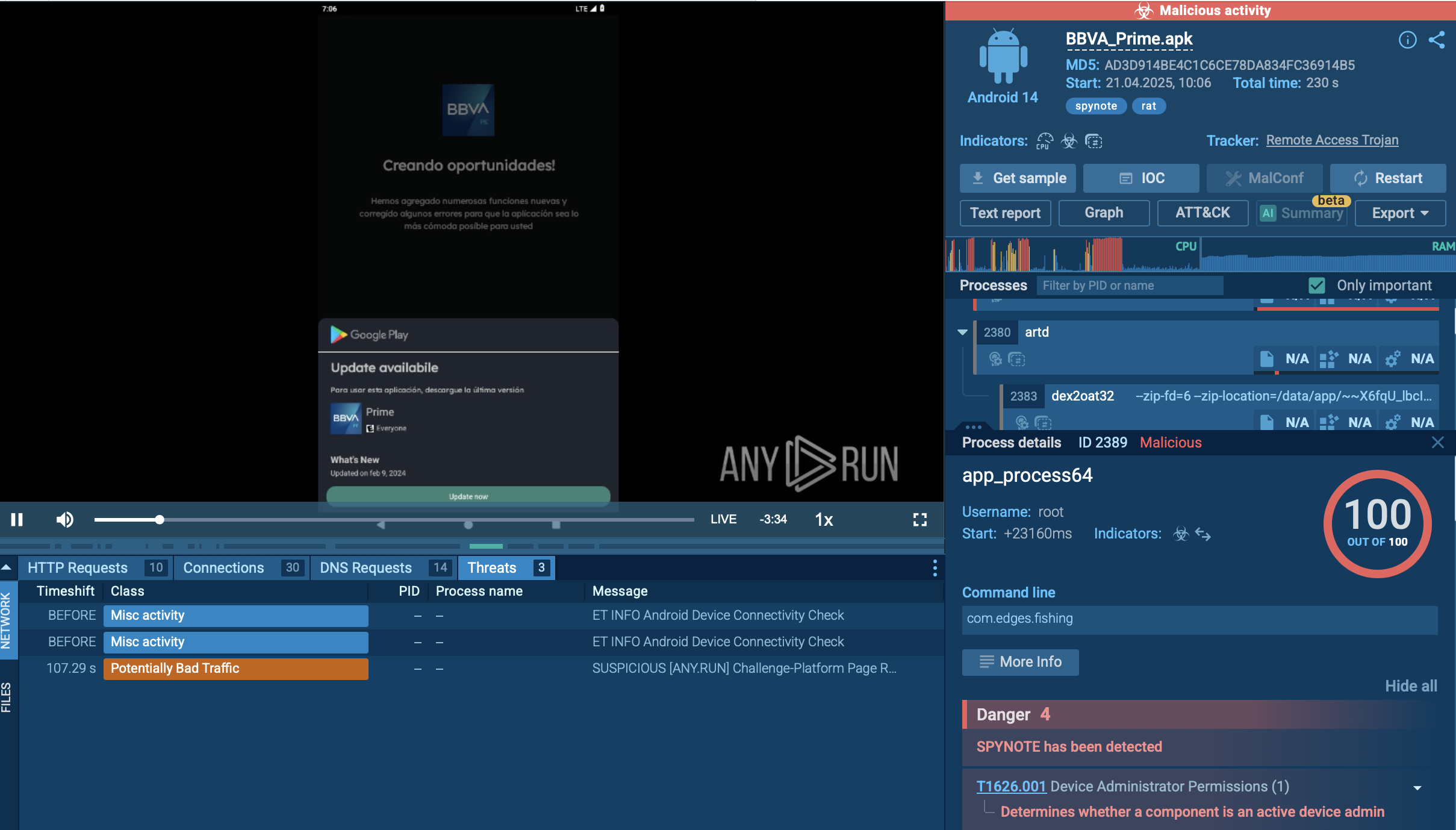 SpynoteSpyNote, also known as SpyMax and CypherRat, is a powerful Android malware family designed primarily for surveillance and data theft, often categorized as a Remote Access Trojan (RAT). Originally emerged in 2016, SpyNote has evolved significantly, with new variants continuing to appear as recently as 2023–2025.
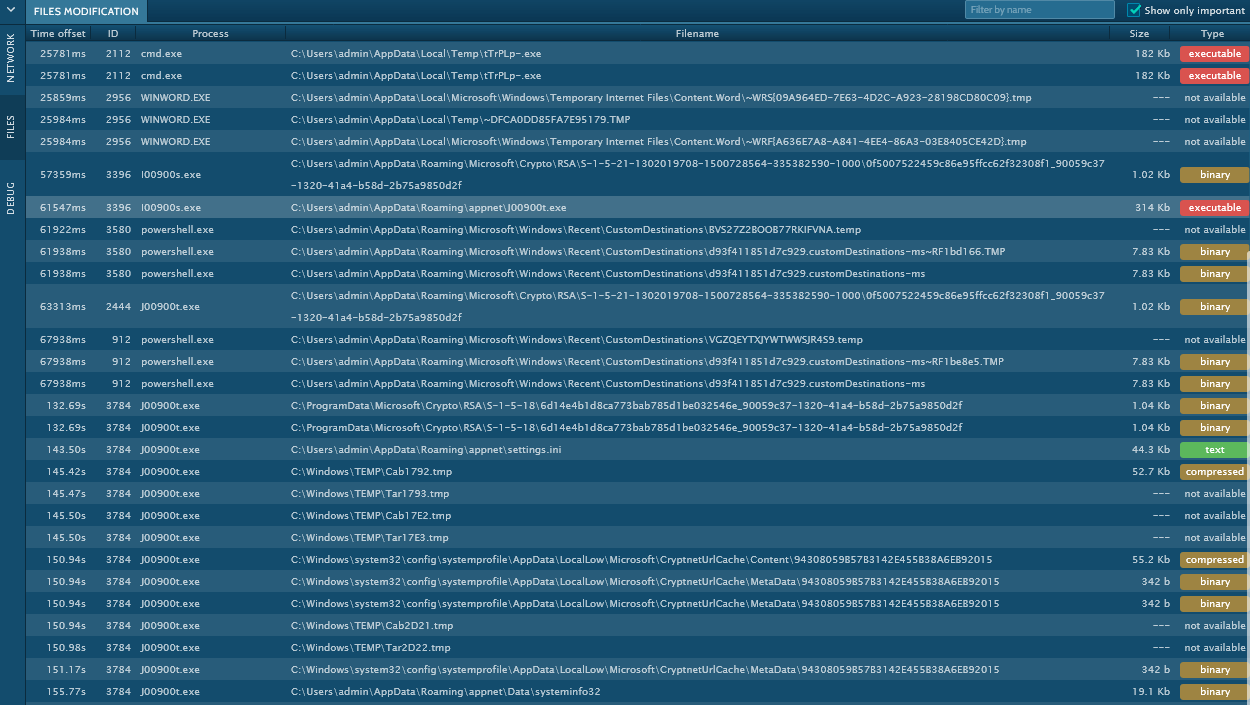 TrickbotTrickBot is an advanced banking trojan that attackers can use to steal payment credentials from the victims. It can redirect the victim to a fake banking cabinet and retrieve credentials typed in on the webpage.
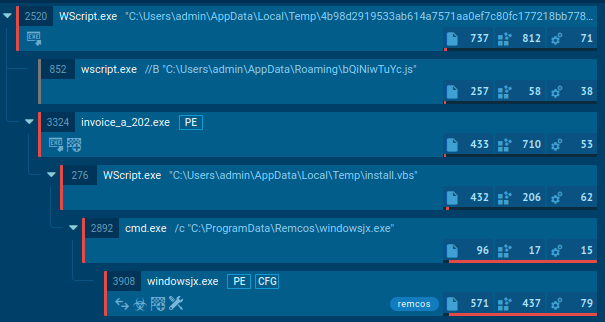 TrojanTrojans are a group of malicious programs distinguished by their ability to masquerade as benign software. Depending on their type, trojans possess a variety of capabilities, ranging from maintaining full remote control over the victim’s machine to stealing data and files, as well as dropping other malware. At the same time, the main functionality of each trojan family can differ significantly depending on its type. The most common trojan infection chain starts with a phishing email.
 DanabotDanabot is an advanced banking Trojan malware that was designed to steal financial information from victims. Out of the Trojans in the wild, this is one of the most advanced thanks to the modular design and a complex delivery method.
 RatonRATRatonRAT is a .NET-based Remote Access Trojan targeting Windows systems. It supports credential theft, screen capture, system and hardware discovery, persistence, and C2 communication. Samples use techniques such as Registry Run keys and scheduled tasks for persistence, with some variants employing anti-analysis and evasion techniques.
 UrsnifUrsnif is a banking Trojan that usually infects corporate victims. It is based on an old malware but was substantially updated over the years and became quite powerful. Today Ursnif is one of the most widely spread banking Trojans in the world.